Greater & Greener is a conference unlike any other. With nearly as many sessions outside as in, it offers an immersive, energizing, and innovative learning experience focused on the issues that you face daily in your work. It’s a conference for doers from government, nonprofits, and communities who are using the power of parks to create more sustainable, vibrant, and equitable cities.
Read more to get practical tips so you feel informed, confident, and excited to register and attend this summer in Austin, Texas. For any other questions, contact us at [email protected].
About Greater & Greener
About the Schedule
About Programming
About Networking
About travel & hotel
Additional tips & Information
About Registering
Register a group
If you are registering a group and also attending the conference, follow these instructions:
Begin by filling out your information in the registration portal.
Once you reach the registration summary page, click “Add Another Member” or “Add Another Non-Member,” depending on your registration pathway.
Once you complete registration for all of your attendees, click “Next,” which will bring you to the payment page.
When you complete group registration, an email confirmation will be sent to each attendee and the group administrator.
If you complete a group registration but need to add more attendees later, you will need to start a new registration and will receive a new invoice.
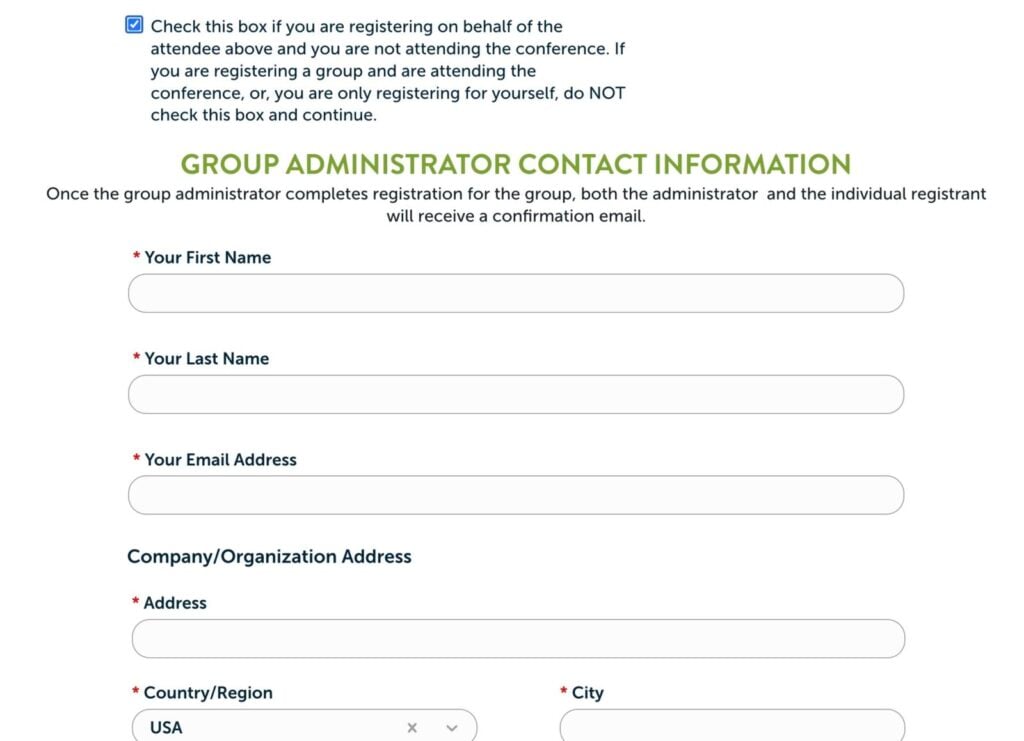
If you are registering a group and not attending the conference, follow these instructions:
Begin by filling out the first attendee’s information in the registration portal.
After the Company/Organization field, click the check box next to “Check this box if you are registering on behalf of the attendee above and you are not attending the conference. If you are registering a group and are attending the conference, or, you are only registering for yourself, do NOT check this box and continue.”
Fill in your information in the “Group Administrator Contact Information” section. This is required to receive an invoice for each attendee in your group.
Once you reach the registration summary page, click “Add Another Member” or “Add Another Non-Member,” depending on your registration pathway.
Once you complete registration for all of your attendees, click “Next,” which will bring you to the payment page.
When you complete group registration, an email confirmation will be sent to each attendee and the group administrator.
If you complete a group registration but need to add more attendees later, you will need to start a new registration and will receive a new invoice.